CS50 Problem Set 9: Flask Web 应用实战
1. Birthdays
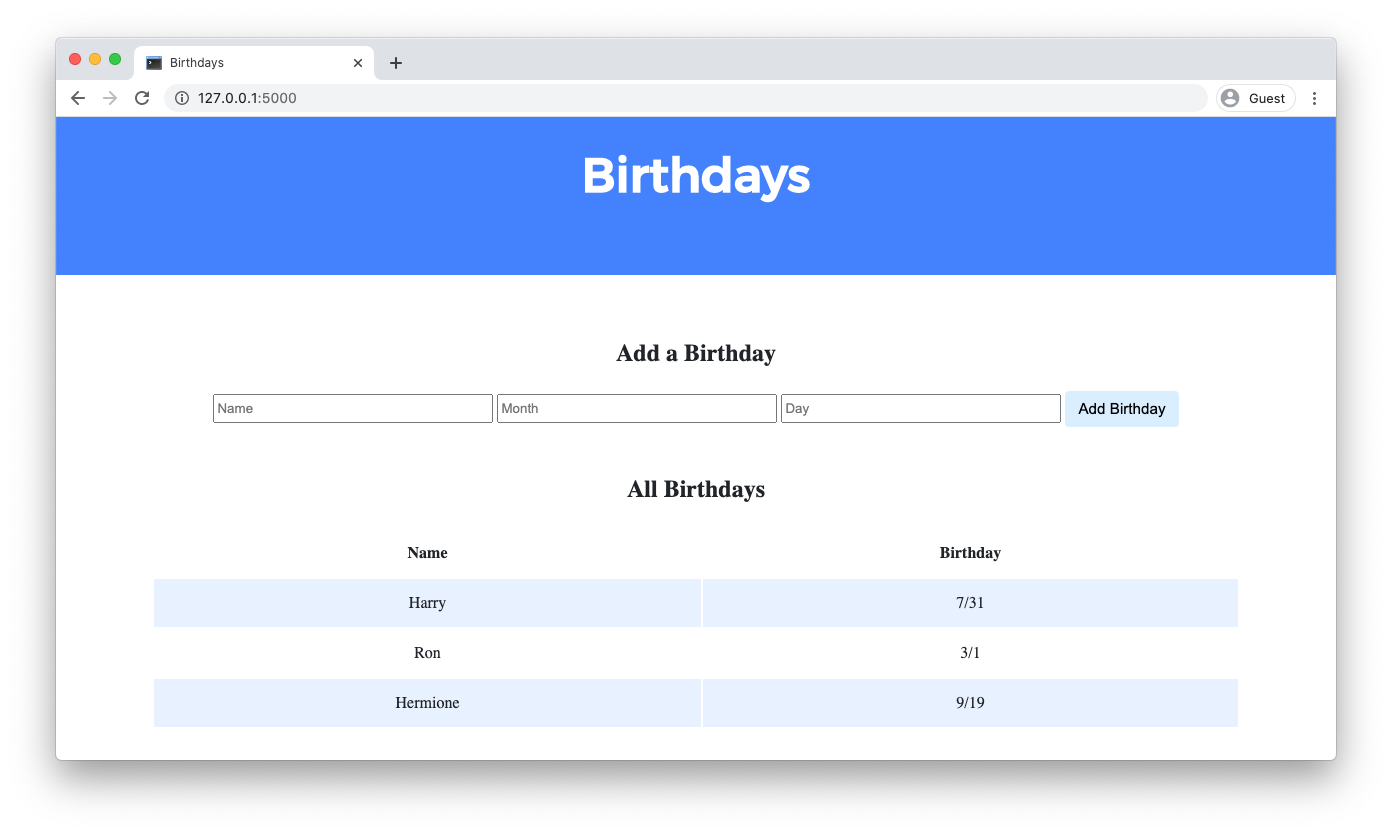
实现一个 Web 应用,用于记录朋友的生日。
 项目文件结构
 tree
.
├── app.py
├── birthdays.db
├── static
│   └── styles.css
└── templates
    └── index.html
数据库结构
sqlite3 birthdays.db
sqlite> .schema
CREATE TABLE birthdays (
    id INTEGER,
    name TEXT,
    month INTEGER,
    day INTEGER,
    PRIMARY KEY(id)
);
我们的任务:完成一个网页应用程序的实现,让用户可以存储和跟踪生日。
后端(Python):接收表单提交的数据,存入数据库。
前端(HTML):制作一个表单让用户输入。
展示(Python + HTML):从数据库取出数据,并在网页上显示出来。
课程以提供了代码框架,我们要实现的细节如下:
- 当用户发起
GET请求/时,程序应该以表格形式显示数据库中所有人员及其生日。app.py的GET请求处理逻辑添加查询birthdays.db库中所有人员及其生日的功能。并将这些数据传递给index.html模板展示。- 在
index.html添加逻辑,每个人的生日渲染为一行,每行数据包含两列,一列为 name,一列为 birthday。
- 当用户发起
POST请求/时,应用需要向数据库添加一行新的数据,并重新渲染 index 页面。index.html中添加表单,允许用户输入姓名、生日月份和生日日期。确保表单通过post的方法提交到/(其“action”)。app.py中,POST请求处理逻辑中,根据用户提供的数据向 birthdays 表中添加一行。
可选任务:- 添加删除/编辑生日条目的功能。
- 添加任何你想添加的功能。
分步实现
- TODO: Create a form for users to submit a name, a month, and a day
回忆下 html 中添加表单的标签
```html
我们需要在这对标签内添加以下字段
- `name`, 类型 `text`
- `month`,类型 `number`
- `day`, 类型 `number`
还需要一个提交按钮,用以提交添加的生日。
```html
<form>
    <input name="name" type="text">
    <input name="month" type="number">
    <input name="day" type="number">
    <input type="submit" value="Add Birthday">
</form>
现在,用户数据表单和提交按钮准备好了,提交到哪里呢?也就是说我们需要 action这个属性指定提交的目的地,根据前面任务分析,提交到 /路由。
<form action="/" method="post">
    <input name="name" type="text">
    <input name="month" type="number">
    <input name="day" type="number">
    <input type="submit" value="Add Birthday">
</form>
为了更完善,通常我们需要加上 placeholder 用以提醒用户输入。同时,为了确认用户与表单意图相符,通常需要添加一些客户端验证,比如,这里的
month 的范围应该为[1,12],day 的范围应该为[1,31]。
<form action="/" method="post">
    <input name="name" placeholder="Name" type="text">
    <input name="month" placeholder="Month" type="number" min="1" max="12">
    <input name="day" placeholder="Day" type="number" min="1" max="31">
    <input type="submit" value="Add Birthday">
</form>
- TODO: Add the user’s entry into the database
回顾下,Flask 提供了request.form.get()方法通过 POST 提交表单数据。因此,前端表单数据可以通过如下方式提交
if request.method == "POST":,qpp.py 需要完成以下逻辑处理:# Access form data name = request.form.get("name") month = request.form.get("month") day = request.form.get("day")下一步就是将这些数据提交到数据库
- 访问数据库
db = SQL("sqlite:///birthdays.db") - 使用 INSERT 语句将数据插入到
birthdays库的birthdays中。db.execute("INSERT INTO birthdays (name, month, day) VALUES(?, ?, ?)", name, month, day)除此之外,实际项目需要考虑处理边界条件的逻辑。比如,这里的
name是否为空,month,day的范围是否符合逻辑。app.py这部分任务完整实现如下:
```PythonAccess form data
name = request.form.get(“name”) if not name: return redirect(“/”)
month = request.form.get(“month”) if not month: return redirect(“/”) try: month = int(month) except ValueError: return redirect(“/”) if month < 1 or month > 12: return redirect(“/”)
day = request.form.get(“day”) if not day: return redirect(“/”) try: day = int(day) except ValueError: return redirect(“/”) if day < 1 or day > 31: return redirect(“/”)
Insert data into database
db.execute(“INSERT INTO birthdays (name, month, day) VALUES(?, ?, ?)”, name, month, day)
进一步优化,当用户提交非法数据是,不是直接返回到 index 页面,而是告知用户明确的错误信息,我们可以用一个 error.html 页面展示:
```html
<!DOCTYPE html>

<html lang="en">
    <head>
        <link href="https://fonts.googleapis.com/css2?family=Montserrat:wght@500&display=swap" rel="stylesheet">
        <link href="/static/styles.css" rel="stylesheet">
        <title>Error</title>
    </head>
    <body>
        <div class="header">
            <h1>Error</h1>
        </div>
        <div class="container">
            <div class="section">
                <h2>{ { message } }</h2>
                <p><a href="/">Go back</a></p>
            </div>
        </div>
    </body>
</html>
app.py 优化如下:
import os

from cs50 import SQL
from flask import Flask, flash, jsonify, redirect, render_template, request, session

# Configure application
app = Flask(__name__)

# Ensure templates are auto-reloaded
app.config["TEMPLATES_AUTO_RELOAD"] = True

# Configure CS50 Library to use SQLite database
db = SQL("sqlite:///birthdays.db")


@app.after_request
def after_request(response):
    """Ensure responses aren't cached"""
    response.headers["Cache-Control"] = "no-cache, no-store, must-revalidate"
    response.headers["Expires"] = 0
    response.headers["Pragma"] = "no-cache"
    return response


@app.route("/", methods=["GET", "POST"])
def index():
    if request.method == "POST":

        # TODO: Add the user's entry into the database
        # 1. 获取用户提交的前端表单数据
        name = request.form.get("name")
        month = request.form.get("month")
        day = request.form.get("day")
        #####  验证数据 #######
        # 2. 验证 name(注意:name.strip() 返回空字符串时为 False)
        if not name or not name.strip():
            return render_template("error.html", message="Name cannot be empty")
        # 3. 验证 month,day 是否存在
        if not month or not day:
            return render_template("error.html",message="Month and day are required")
        # 4. 将 month,day 转换为整数,并捕获异常
        try:
            month = int(month)
            day = int(day)
        except ValueError:
            return render_template("error.html", message="Month and day must be numbers")
        # 验证 month,day 的数值范围
        if month < 1 or month > 12:
            return render_template("error.html",message="month must be between 1 and 12")
        if day < 1 or day > 31:
            return render_template("error.html", message="day must be between 1 and 31")
        # 更严格的数值范围验证
        days_in_month = {
            1: 31, 2: 29, 3: 31, 4: 30, 5: 31, 6: 30,
            7: 31, 8: 31, 9: 30, 10: 31, 11: 30, 12: 31
        }
        if day > days_in_month[month]:
            return render_template("error.html",message=f"Month {month} doesn't have {day} days")
        # 清除 name 首尾空格
        name = name.strip()
        # 插入数据库
        db.execute("INSERT INTO birthdays (name, month, day) VALUES (?, ?, ?)", name, month, day)
        return redirect("/")

    else:
        # TODO: Display the entries in the database on index.html
        # GET 请求,从数据库查询所有数据
        birthdays = db.execute("SELECT * FROM birthdays")
        return render_template("index.html", birthdays=birthdays)
OK,现在写的部分(更新数据)已经完成了,下面实现读的部分(读取展示数据)
对应 app.py 中 else 部分应该完成以下逻辑处理:
- 查询所有生日数据
birthdays = db.execute("SELECT * FROM birthdays") - 渲染模板,并将
birthdays变量传递给index.htmlreturn render_template("index.html", birthdays=birthdays)对应的 index.html 中第二部分 TODO 需要完成以下逻辑处理:
                 <tbody>
                     <!-- 遍历后端传过来的 birthdays 列表 -->
                     { % for birthday in birthdays % }
                         <tr>
                             <!-- 显示名字 -->
                             <td>{ { birthday.name } }</td>
                             <!-- 显示日期 -->
                             <td>{ { birthday.month } }/{ { birthday.day } }</td>
                         </tr>
                     { % endfor % }
                 </tbody>
演示
演示验证我们的 Birthdays 应用
- 运行
flask run
浏览器中打开页面
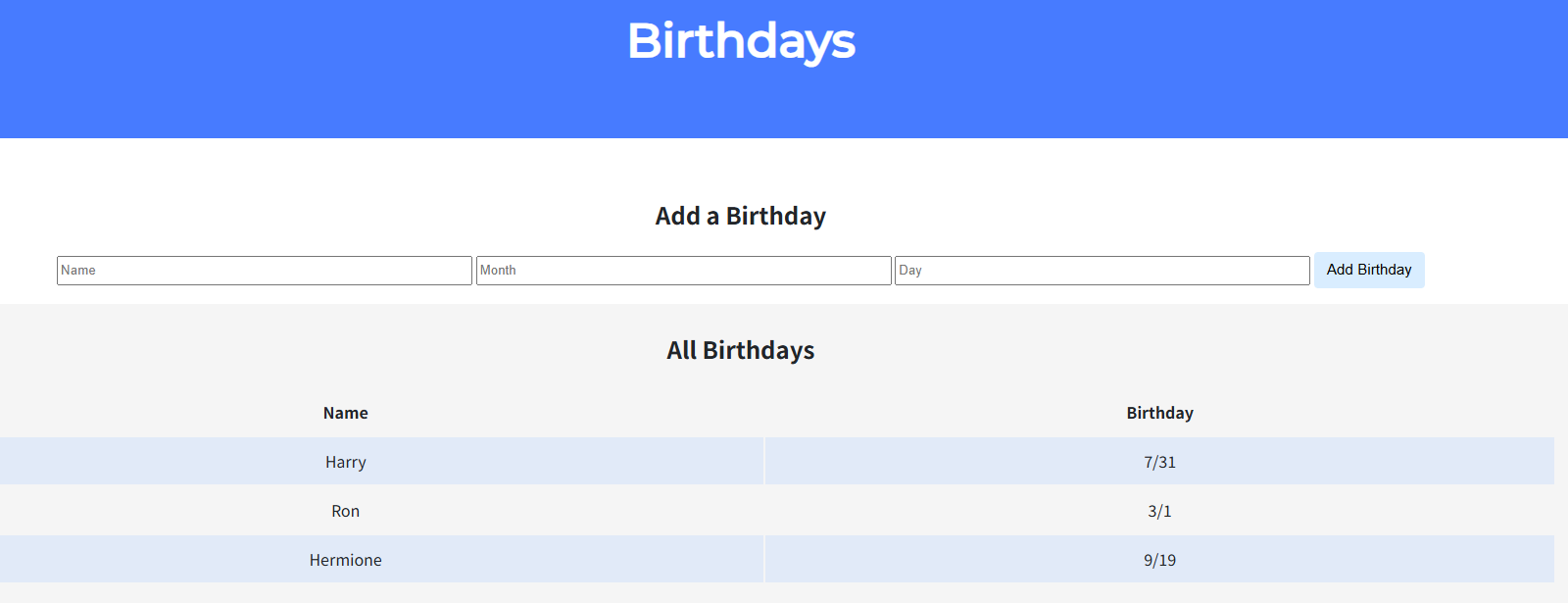
SELECT * FROM birthdays;查询数据库可以看到确实有三条数据。 - 添加数据
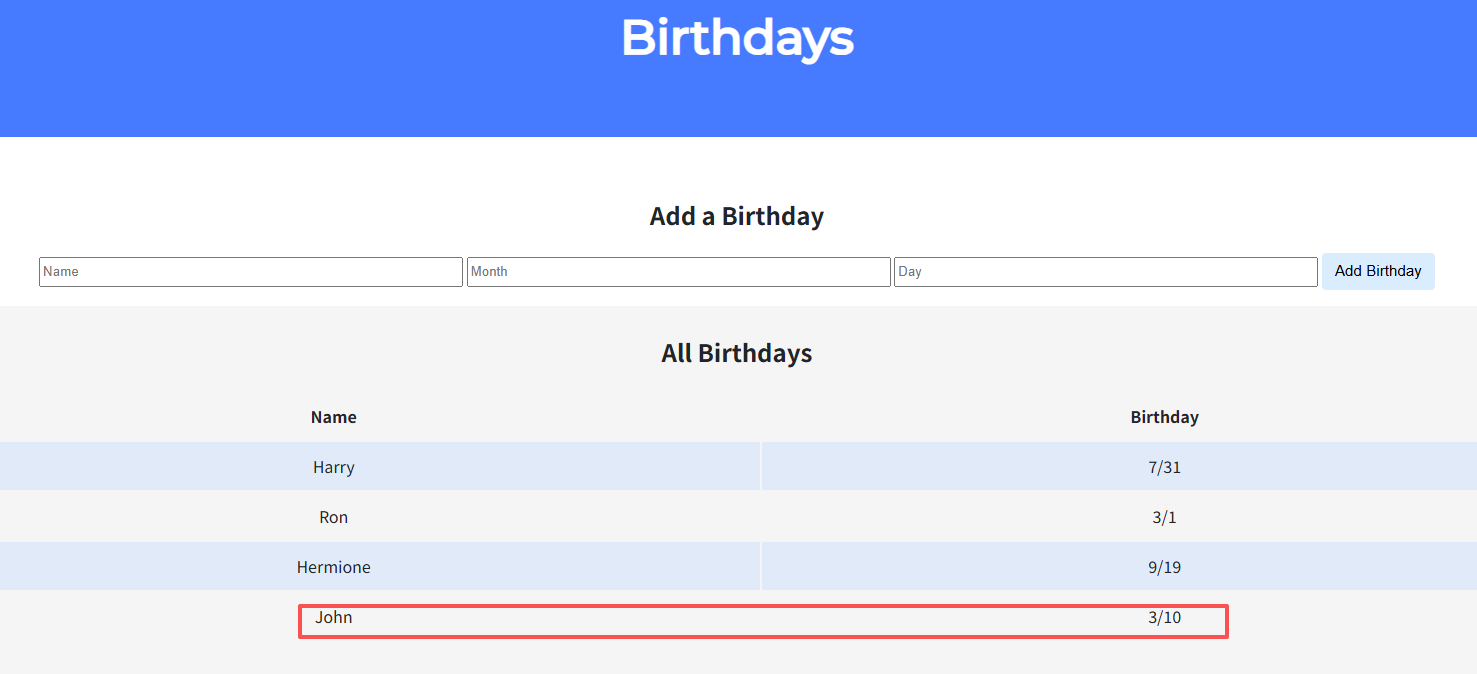
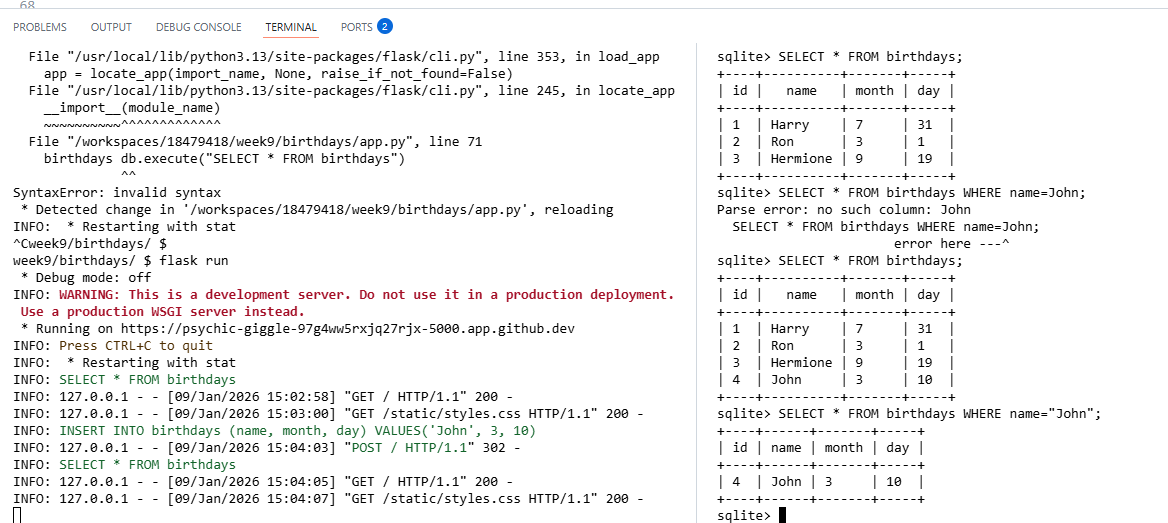
查询数据库,也有了上面新插入的数据SELECT * FROM birthdays WHERE name="John"; +----+------+-------+-----+ | id | name | month | day | +----+------+-------+-----+ | 4 | John | 3 | 10 | +----+------+-------+-----+同时控制台日志也显示插入成功
- 插入一条非法数据,返回错误提示
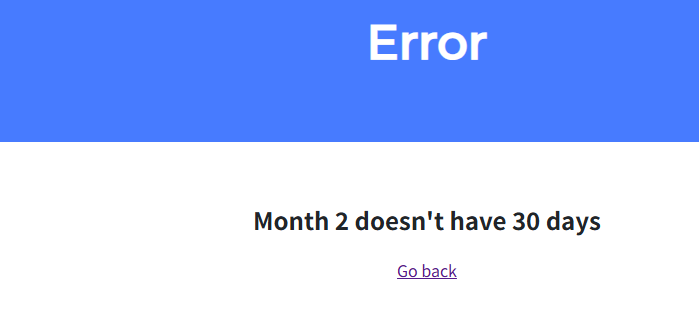
这只是简单 demo 演示,实际生产环境中我们部署这样的web 程序还有其它考虑。2. Finance
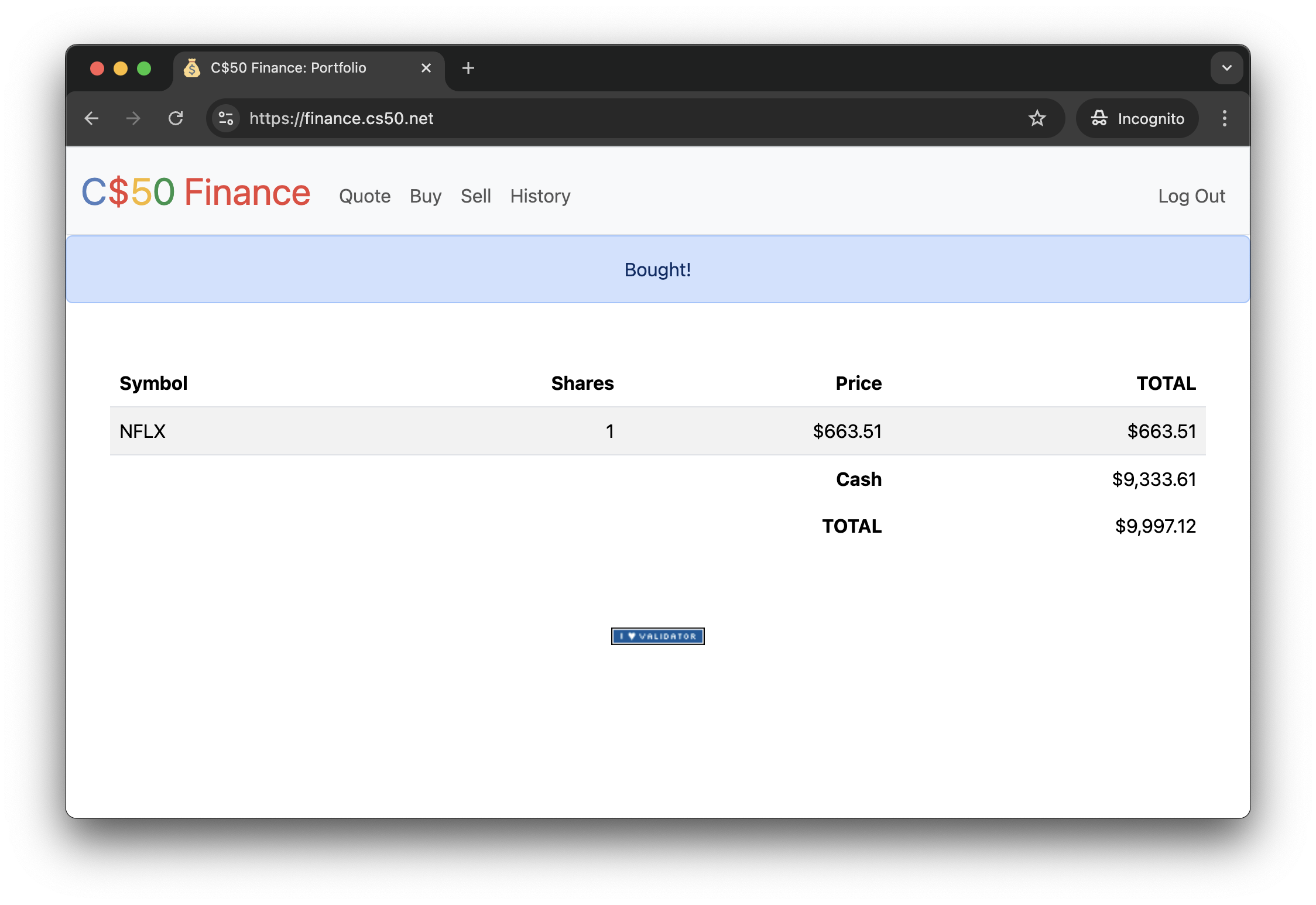
实现一个网站,用户可以通过该网站“购买”和“出售”股票,类似于下面的示例。
问题背景
如果你不太清楚买卖股票(即公司股份)是什么意思,可以来这里学习教程(还挺有意思,做CS作业,还附赠股票课程)。
项目文件结构week9/finance/ $ tree . ├── app.py ├── finance.db ├── helpers.py ├── requirements.txt ├── static │ ├── favicon.ico │ ├── I_heart_validator.png │ └── styles.css └── templates ├── apology.html ├── layout.html └── login.html查看数据库
sqlite3 finance.db
sqlite> .schema
CREATE TABLE users (id INTEGER PRIMARY KEY AUTOINCREMENT NOT NULL, username TEXT NOT NULL, hash TEXT NOT NULL, cash NUMERIC NOT NULL DEFAULT 10000.00);
CREATE TABLE sqlite_sequence(name,seq);
CREATE UNIQUE INDEX username ON users (username);
执行
flask run查看初始页面,我们看到一个登录页面,看一下就好,现在不要做任何操作。
首先,根据课程页面和课程提供的源码分析项目。这是一个标准的MVC架构项目。项目概述
C$50 Finance - 一个让用户可以”买卖”股票的网站,使用真实的股票价格数据。
核心功能
- 注册/登录 - 用户账户系统
- 查询股票 - 查看股票实时价格
- 买入股票 - 用模拟资金购买股票
- 卖出股票 - 出售持有的股票
- 查看投资组合 - 显示持有的股票和总资产
- 交易历史 - 查看所有买卖记录
一、理解现有架构与设计数据库
在写任何 Python 代码之前,我们必须先看懂现有的代码,并设计好数据的存储方式。
1. 理解核心文件
app.py
```Python所有路由:
- /login (登录)
- /logout (登出)
- /register (注册) - 你需要实现
- /quote (查询股票) - 你需要实现
- /buy (买入) - 你需要实现
- /sell (卖出) - 你需要实现
- / (首页/投资组合) - 你需要实现
- /history (历史记录) - 你需要实现
```
项目已经实现了/login(登录) 和/logout(登出)。而且已经写好了禁止缓存after_request和装饰器login_required。 helpers.py
这个文件提供了三个重要的函数。
```Python def apology(message, code=400): “"”渲染错误页面””” # 用于显示错误信息
def login_required(f): “"”装饰器:要求用户登录””” # 用于保护需要登录的路由
def lookup(symbol): “"”查询股票价格””” # 输入: “AAPL” (股票代码) # 输出: {“name”: “Apple Inc.”, “price”: 150.25, “symbol”: “AAPL”} # 如果找不到返回 None
def usd(value): “"”格式化为美元””” # 输入: 1234.56 # 输出: “$1,234.56”
### 2. 设计数据库
由前面查询数据库信息可知,目前的 `finance.db` 只有一张 `users` 表,用来存用户名、密码哈希和现金。
通过前面的分析我们知道**需要记录用户买卖了什么股票**。
因此,需要创建一张新的表,**交易记录表 `transactions`**。每行记录应该包含以下:
1. **id**:交易记录的唯一编号。
2. **user_id**:哪个用户做的交易,关联 users 表的 id。
3. **symbol**:买卖了那支股票?(TEXT)
4. **shares**:买了多少股?(INTEGER),如果是卖出,可以存负数,或者加一个 `type` 字段(buy/sell),为了简化逻辑,建议**买入存正数,卖出存负数**。
5. **price**:当时的成交单价是多少?(NUMERIC)
6. **timestamp**: 什么时候买的?(DATETIME,默认值为当前时间)。
终端执行 `sqlite3 finance.db` 打开 `finance.db` 库,写入下面的建表语句:
```sql
CREATE TABLE transactions (
    id INTEGER PRIMARY KEY AUTOINCREMENT,
    user_id INTEGER NOT NULL,
    symbol TEXT NOT NULL,
    shares INTEGER NOT NULL,
    price NUMERIC NOT NULL,
    transacted_timestamp DATETIME DEFAULT CURRENT_TIMESTAMP,
    FOREIGN KEY(user_id) REFERENCES users(id)
);
提示:建立好表后,用 .schema transactions 确认一下。
另外,为了加快查询,创建索引
CREATE INDEX idx_user_transactions ON transactions(user_id);
CREATE INDEX idx_user_symbol ON transactions(user_id, symbol);
二、实现注册功能
用户需要先有账号才能登录,所以注册功能可以仿照登录功能的实现。
1. 前端(register.html)
- 创建一个表单,包含用户名(
username,text),密码(password,text),确认(confirmation) - 提交到
/register,方法post。2. 后端(
app.py->def register): - GET 请求:渲染 register.html
- POST 请求:
- 获取用户输入的用户名,密码(
request.form.get())等。 - 校验
- 用户名是否为空?
return apology(...) - 密码是否为空?
return apology(...) - 两次密码是否一致?
return apology(...)
- 用户名是否为空?
- 查询数据库,用户名是否已存在?
这个有两种写法:- 索引的主动查询(
"SELECT * FROM users WHERE username = ?", username) - 唯一约束的被动捕获(
try ... except)
新手建议方法1,简单直接。
- 索引的主动查询(
- 哈希密码:千万不能存明文密码。使用
werkzeug.security里的generate_password_hash。 - 插入数据库:(
"INSERT INTO users ...”) - 登录 (可选): 可以直接把用户存入
session["user_id"],或者简单的return redirect("/login")让用户自己登录。核心代码
- 获取用户输入的用户名,密码(
/registerif request.method == "POST": username = request.form.get("username") password = request.form.get("password") confirmation = request.form.get("confirmation") # check # 1. check username and password is not empty # if not username or not password or not confirmation: if not username: return apology("must provide username", 400) if not password: return apology("must provide password", 400) if not confirmation: return apology("must provide confirmation", 400) # 2.check if passwords match for the confirmation if password != confirmation: return apology("confirmation does not match pawword", 400) # check if username has already taken existing = db.execute("SELECT * FROM users WHERE username = ?", username) if existing: return apology("username has already been taken", 400) # insert user account into database hash_password = generate_password_hash(password) # db.execute 对于 INSERT 语句返回新插入行的 id user_id = db.execute("INSERT INTO users (username, hash) VALUES (?, ?)", username, hash_password) session["user_id"] = user_id return redirect("/") else: # GET return render_template("register.html")templates/register.html<form action="/register" method="post"> <div class="mb-3"> <input autocomplete="off" autofocus class="form-control mx-auto w-auto" name="username" placeholder="Username" type="text"> </div> <div class="mb-3"> <input class="form-control mx-auto w-auto" name="password" placeholder="Password" type="password"> </div> <div class="mb-3"> <input class="form-control mx-auto w-auto" name="confirmation" placeholder="Confirm Password" type="password"> </div> <button class="btn btn-primary" type="submit">Register</button> </form>验证
对于这种复杂的项目,一定每实现一个功能就验证一下,确保子功能的正确性,不要想着毕其功于一役。否则,等你全部实现完,再调试,难度非常大。 测试,通过日志调试
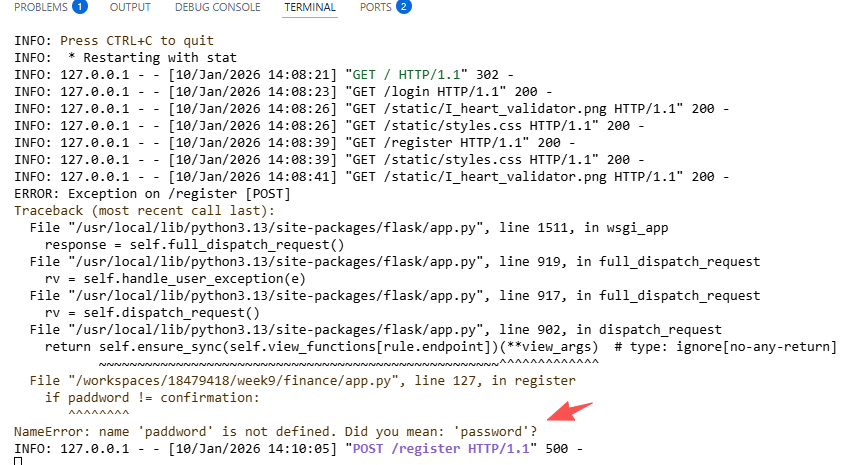
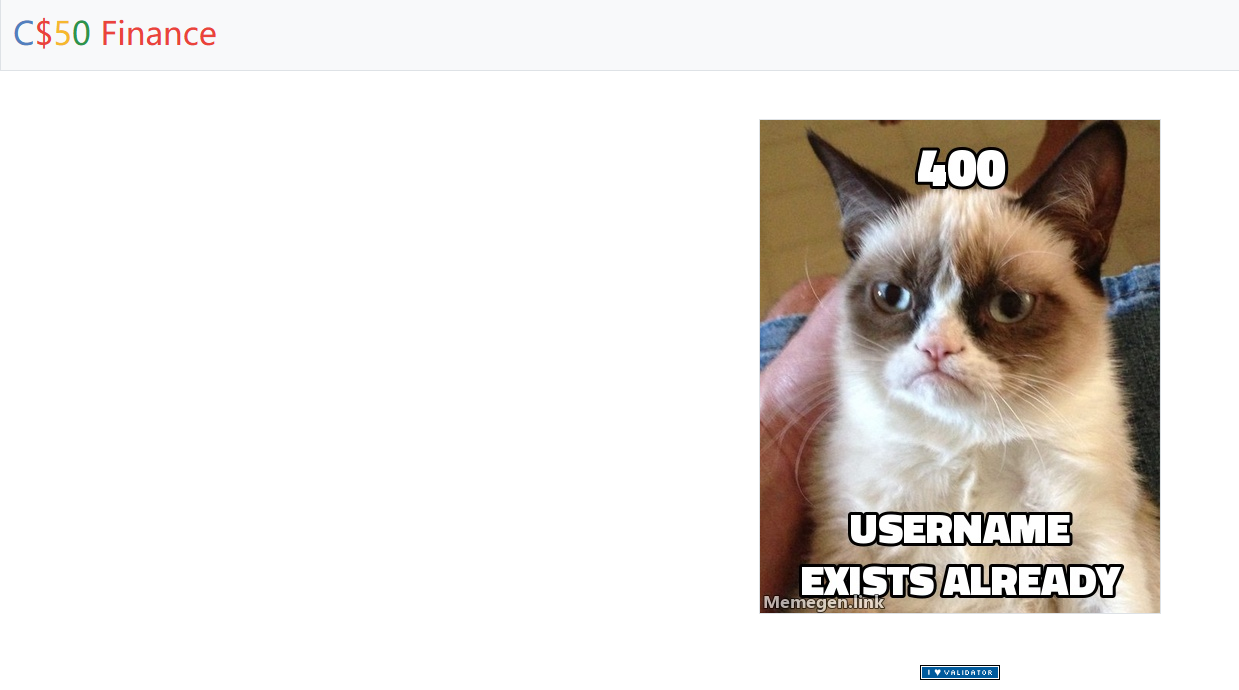
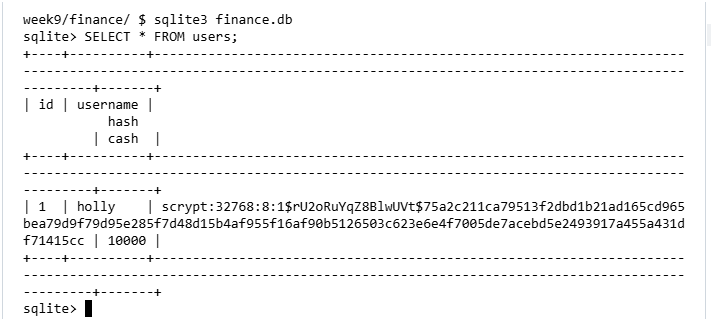
查询数据库 users 表可以看到用户账户已添加到数据库
三、查价功能(quote)
这是最简单的业务功能。
1. 前端
quote.html:一个简单的表单,输入股票代码(symbol),提交按钮。2. 后端
app.py/def quote()- POST 请求:
- 获取
symbol。 - 调用
helpers.py中的lookup(symbol) - 如果查无股,返回
apology。 - 如果成功,渲染一个新页面,把股票名字,代码,价格展示到页面。
- 获取
- POST 请求:
- 提示:可以使用
usd过滤器在 HTML 中美化价格,例如{ { price | usd } }。核心代码
/quoteif request.method == "POST": symbol = request.form.get("symbol") if not symbol: return apology("must provide symbol", 400) # 注意:symbol 是字符串,不是函数,所以是 symbol.upper() 而不是 symbol().upper() stock = lookup(symbol.upper()) if stock is None: return apology("invalid symbol", 400) return render_template("quoted.html", stock=stock) else: return render_template("quote.html")templates/quoted.html<h2>Stock Quote</h2> <p> A share of { { stock.name } } ({ { stock.symbol } }) costs { { stock.price | usd } }. </p> <a href="/quote">Quote Another</a>templates/quote.html<form action="/quote" method="post"> <div class="mb-3"> <input autocomplete="off" autofocus class="form-control mx-auto w-auto" name="symbol" placeholder="Symbol" type="text"> </div> <button class="btn btn-primary" type="submit">Quote</button> </form>测试
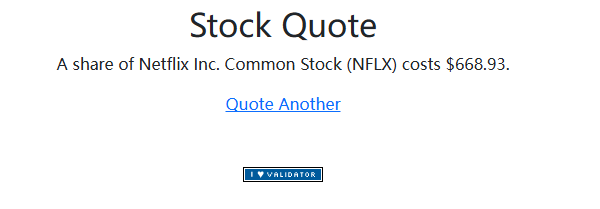
四、买入功能
/buy,这是逻辑最复杂的一个任务,因为涉及到钱和货的流转。1. 前端(
buy.html)- 表单,输入
symbol(text) 和shares(number) - 注意,shares 的值必须是整数。
2. 后端(
app.py -> def buy()) - 获取数据:股票代码和购买份额。
- 检验:
- 用户是否正确提交了
symbol和shares。 - 股票代码是否有效(调用
lookup查询)。 - 购买份额的数值范围是否合法(是否正整数)。
Python技巧:if not shares.isdigit()或者用try/except转换int。
- 用户是否正确提交了
- 计算:
- 查询当前该股票价格
price。 - 计算总共花费
total_cost = price * shares。
- 查询当前该股票价格
- 查询:
- 查询当前用户账户还有多上钱:
"SELECT cash FROM users WHERE id = usr_id"
- 查询当前用户账户还有多上钱:
- 判断:
- 如果
cash < total_cost:return apology("Can't afford")。
- 如果
- 执行交易(原子操作):
- 扣钱:更新 users 表,
"UPDATE users SET cash = cash - total_cost WHERE id = user_id" - 记账:更新 transactions 表,记录购买的股票,份额,当时购买单价。
核心代码
- 扣钱:更新 users 表,
- 表单,输入
/buyif request.method == "POST": symbol = request.form.get("symbol") shares = request.form.get("shares") # check data # 1. check symbol and shares are not empty if not symbol: return apology("must provide symbol", 400) if not shares: return apology("must provide shares", 400) # 2. check if shares is a positive integer try: shares = int(shares) if shares <= 0: return apology("shares must be positive", 400) except ValueError: return apology("shares must be a positive integer", 400) # get the stock through lookup stock = lookup(symbol) if stock is None: return apology("invalid symbol", 400) # compute total cost to buy the stock total_cost = shares * stock["price"] # check if the user has enough cash to buy the stock user = db.execute("SELECT cash FROM users WHERE id = ?", session["user_id"]) cash = user[0]["cash"] if cash < total_cost: return apology("you do not have enough cash to buy the stock", 400) # update the user's cash db.execute("UPDATE users SET cash = cash - ? WHERE id = ?", total_cost, session["user_id"]) # record transactions(注意:字段名是 user_id,不是 id) db.execute("INSERT INTO transactions (user_id, symbol, shares, price) VALUES (?, ?, ?, ?)", session["user_id"], stock["symbol"], shares, stock["price"]) # flash a message flash(f"Bought {shares} shares of {symbol} for {usd(total_cost)}") return redirect("/") else: return render_template("buy.html")templates/buy.html<form action="/buy" method="post"> <div class="mb-3"> <input autocomplete="off" autofocus class="form-control mx-auto w-auto" name="symbol" placeholder="Symbol" type="text"> </div> <div class="mb-3"> <input class="form-control mx-auto w-auto" min="1" name="shares" placeholder="Shares" type="number"> </div> <button class="btn btn-primary" type="submit">Buy</button> </form>验证
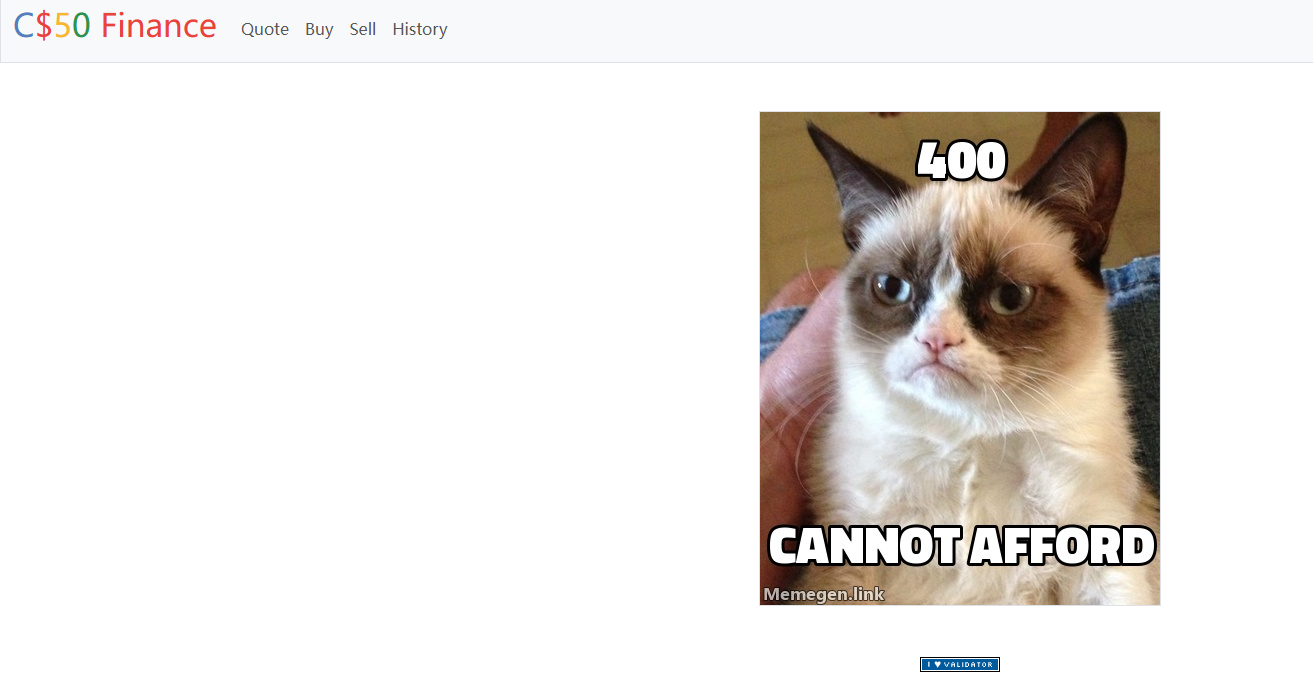
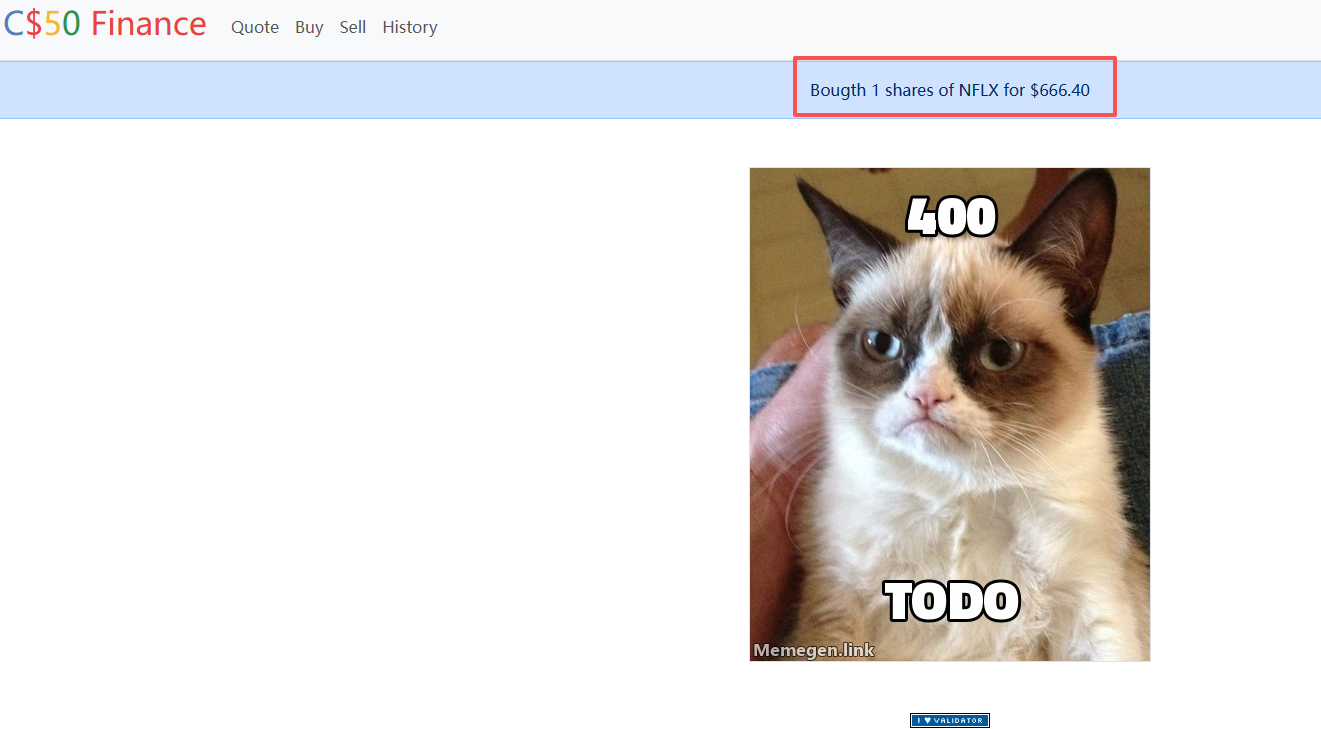
前面可知 单价 $668.77,现在我们买20股,被告知cannot afford。因为每个用户默认初始 cash 为1000。看来我们只能先买一股用去测试了。 当前只有两个用户,所以我在交易后后台查询数据库就没有使用 WHERE指令,可以看出 cash 金额发生了变化。
五、首页 (index)
投资组合,难点在于数据聚合。
首页需要展示当前用户的“投资组合”:比如你持有多少 Apple?多少 Google?现在的总市值是多少?
这需要一些复杂的逻辑,因为数据库 transactions 存的是流水账 买+10,买+5,卖-3)。
需要使用 Python 或者 SQL 进行聚合操作。后端逻辑
- 查询交易记录:找出当前用户所有交易记录。
- 建议 SQL:
SELECT symbol, SUM(shares) as total_shares FROM transactions WHERE user_id = ? GROUP BY symbol HAVING total_shares > 0 - 说明:
SUM(shares)会自动处理买入(正)和卖出(负)的抵消。HAVING total_shares > 0过滤掉那些已经卖光了的股票。
2. 准备表格数据 - 创建一个空列表
portfolio。 - 遍历刚才查到的每一行数据
- 拿到 symbol
- 再次调用 lookup 查询当前最新价格
- 计算该股票的总市值(
total_share * current_price) - 把这些信息整理好放入
portfolio列表。- 查询现金:查
users表中的余额。 - 计算总资产:现金 + 当前股票的总市值。
- 渲染页面: 把 portfolio、cash、total 传给 index.html 进行表格展示。
核心代码
- 查询现金:查
/# 查询用户持有的股票(注意:字段名是 user_id,SQL 需要逗号分隔) portfolio = db.execute(""" SELECT symbol, SUM(shares) as total_shares FROM transactions WHERE user_id = ? GROUP BY symbol HAVING SUM(shares) > 0 """, session["user_id"]) # get the cash the user has user = db.execute("SELECT cash FROM users WHERE id = ?", session["user_id"]) cash = user[0]["cash"] # compute the total value of the user's portfolio total_value = cash # set total_value initially to the cash the user has for stock in portfolio: quote = lookup(stock["symbol"]) stock["name"] = quote["name"] stock["price"] = quote["price"] stock["total"] = stock["price"] * stock["total_shares"] total_value += stock["total"] return render_template("index.html", portfolio=portfolio, cash=cash, total_value=total_value)templates/index.html<h2>Portfolio</h2> <table class="table table-striped"> <thead> <tr> <th>Symbol</th> <th>Name</th> <th>Shares</th> <th>Price</th> <th>Total</th> </tr> </thead> <tbody> { % for stock in portfolio % } <tr> <td>{ { stock.symbol } }</td> <td>{ { stock.name } }</td> <td>{ { stock.total_shares } }</td> <td>{ { stock.price | usd } }</td> <td>{ { stock.total | usd } }</td> </tr> { % endfor % } </tbody> <tfoot> <tr> <td colspan="4"><strong>Cash</strong></td> <td>{ { cash | usd } }</td> </tr> <tr> <td colspan="4"><strong>Total</strong></td> <td><strong>{ { total | usd } }</strong></td> </tr> </tfoot> </table>六、卖出(sell)
逻辑和 buy 类似,但是方向是反的。
前端逻辑:
可以做一个下拉菜单(
<select>),显示当前用户持有的股票(需要把用户当前持有的股票传递给前端)。后端逻辑
- 校验:用户是否持有该股票,持有数量 >= 卖出数量?
- 执行
- users 表改用的 cash 增加
- transactions 表插入记录(shares 记为负数)。
/sell(核心代码)if request.method == "POST": symbol = request.form.get("symbol") shares = request.form.get("shares") # check data from user if not symbol or not shares: return apology("must provide symbol and shares", 400) # check if the shares value is integer try: shares = int(shares) if shares <= 0: return apology("shares must be positive", 400) except ValueError: return apology("shares must be a positive integer", 400) # get how many shares the user holds(注意:字段名是 user_id) holdings = db.execute(""" SELECT SUM(shares) as total_shares FROM transactions WHERE user_id = ? AND symbol = ? """, session["user_id"], symbol) # check if the user owns any shares of the stock if not holdings or holdings[0]["total_shares"] is None or holdings[0]["total_shares"] <= 0: return apology("you do not own any shares of the stock", 400) # check if the user has enough shares to sell if holdings[0]["total_shares"] < shares: return apology("you do not have enough shares to sell", 400) # get the current price of the stock stock = lookup(symbol) if stock is None: return apology("invalid symbol", 400) # compute the total value total_sale = shares * stock["price"] # update the user's cash db.execute("UPDATE users SET cash = cash + ? WHERE id = ?", total_sale, session["user_id"]) # record transactions(注意:卖出时 shares 存为负数 -shares) db.execute("INSERT INTO transactions (user_id, symbol, shares, price) VALUES (?, ?, ?, ?)", session["user_id"], symbol, -shares, stock["price"]) flash(f"Sold {shares} shares of {symbol} for {usd(total_sale)}") return redirect("/") else: # GET request # 获取用户持有的股票列表 stocks = db.execute(""" SELECT symbol FROM transactions WHERE user_id = ? GROUP BY symbol HAVING SUM(shares) > 0 """, session["user_id"]) return render_template("sell.html", stocks=stocks)templates/sell.html```html { % extends “layout.html” % }
{ % block title % } Sell { % endblock % }
{ % block main % } <form action="/sell" method="post"> <div class="mb-3"> </div> <div class="mb-3"> </div> </form> { % endblock % }
## 七、交易历史
很简单的一步。
1. 直接  `SELECT * FROM transactions WHERE user_id = ?`
2. 传给前端表单展示。
### 核心代码
- `/history`
```Python
    transactions = db.execute("""
        SELECT symbol, shares, price, transacted_timestamp
        FROM transactions
        WHERE user_id = ?
        ORDER BY transacted_timestamp DESC
    """, session["user_id"])

    return render_template("history.html", transactions=transactions)
templates/history.html<h2>Transaction History</h2> <table class="table table-striped"> <thead> <tr> <th>Symbol</th> <th>Shares</th> <th>Price</th> <th>Transacted</th> </tr> </thead> <tbody> { % for transaction in transactions % } <tr> <td>{ { transaction.symbol } }</td> <td> { % if transaction.shares > 0 % } <span class="text-success">+{ { transaction.shares } }</span> { % else % } <span class="text-danger">{ { transaction.shares } }</span> { % endif % } </td> <td>{ { transaction.price | usd } }</td> <td>{ { transaction.timestamp } }</td> </tr> { % endfor % } </tbody> </table>额外功能
1. 添加更改密码功能
后端逻辑
- 接收用户输入的新密码,旧密码,确认
- 校验
- 校验输入不为空
- 查询数据库中旧密码是否正确
3. 更新数据库中 users 表。代码
/change_password@app.route("/change_password", methods=["GET", "POST"]) @login_required def change_password(): """Change user password""" if request.method == "POST": old_password = request.form.get("old_password") new_password = request.form.get("new_password") confirmation = request.form.get("confirmation") # 验证输入 if not old_password or not new_password or not confirmation: return apology("must fill all fields", 400) if new_password != confirmation: return apology("passwords do not match", 400) # 验证旧密码 user = db.execute("SELECT hash FROM users WHERE id = ?", session["user_id"]) if not check_password_hash(user[0]["hash"], old_password): return apology("invalid old password", 400) # 更新密码 new_hash = generate_password_hash(new_password) db.execute("UPDATE users SET hash = ? WHERE id = ?", new_hash, session["user_id"]) flash("Password changed successfully!") return redirect("/") else: return render_template("change_password.html")templates/change_password.html
```html { % extends “layout.html” % }
{ % block title % } Change Password { % endblock % }
{ % block main % } <h2>Change Password</h2> <form action="/change_password" method="post"> <div class="mb-3"> </div> <div class="mb-3"> </div> <div class="mb-3"> </div> </form> { % endblock % }
### 2. 添加充值功能
#### 后端逻辑
这个逻辑也很简单,就是更新 users 表中用户的 cash 金额
#### 核心代码
- `/add_cash`
```Python
@app.route("/add_cash", methods=["GET", "POST"])
@login_required
def add_cash():
    """Add cash to account"""

    if request.method == "POST":
        amount = request.form.get("amount")

        try:
            amount = float(amount)
            if amount <= 0:
                return apology("amount must be positive", 400)
        except ValueError:
            return apology("invalid amount", 400)

        # 添加现金
        db.execute("UPDATE users SET cash = cash + ? WHERE id = ?",
                   amount, session["user_id"])

        flash(f"Added {usd(amount)} to your account!")
        return redirect("/")

    else:
        return render_template("add_cash.html")
templates/add_cash.html<h2>Add Cash</h2> <form action="/add_cash" method="post"> <div class="mb-3"> <input autocomplete="off" autofocus class="form-control mx-auto w-auto" name="amount" placeholder="Amount (USD)" type="number" min="0.01" step="0.01" required> </div> <button class="btn btn-primary" type="submit">Add Cash</button> </form> <div class="mt-4 text-muted"> <small> <p>Note: This is a simulation. In a real application, this would integrate with a payment gateway.</p> <p>Minimum amount: $0.01</p> </small> </div>附录
结合
finance.db解释一下此前SQL课程中没有遇到的知识。sqlite3 finance.db sqlite> .schema CREATE TABLE users (id INTEGER PRIMARY KEY AUTOINCREMENT NOT NULL, username TEXT NOT NULL, hash TEXT NOT NULL, cash NUMERIC NOT NULL DEFAULT 10000.00); CREATE TABLE sqlite_sequence(name,seq); CREATE UNIQUE INDEX username ON users (username);可以看到,除了
CREATE了一张users表,还有两条CREATE指令。
这是一个非常敏锐的观察!你能注意到这三条指令,说明你查看.schema时非常仔细。
这两条指令分别代表了 SQLite 数据库的两个重要机制:自动增长计数器 和 唯一性索引。
它们对 Finance 项目意味着什么呢?
1. CREATE TABLE sqlite_sequence(name,seq);
这条指令是 SQLite 自动生成的,通常你不需要手动去碰它。
- 它的来源:
在
users表的定义中,可以看到了id INTEGER PRIMARY KEY AUTOINCREMENT。当你使用了AUTOINCREMENT(自动增长)关键字时,SQLite 就必须找个地方拿小本本记下来:“users 表的 ID 目前发到了第几号?” - 它的作用:
sqlite_sequence就是那个“小本本”。name: 表的名字(比如 “users”)。seq: 当前最大的序号(比如你已经注册了 5 个用户,这里就是 5)。
- 为什么要它:
如果没有它,假设你删除了 ID 为 5 的用户,下一个新注册的用户可能会重用 ID 5。但有了
AUTOINCREMENT和这张表,SQLite 会确保 ID 永远向上增加(下一个是 6),不会回退。 - 给新手的建议: 完全忽略它。它是数据库内部维护秩序的“幕后工作人员”,你在写 Python 代码或 SQL 查询时,永远不需要直接操作这张表。
2. CREATE UNIQUE INDEX username ON users (username);
这条指令非常重要,它直接关系到 Register (注册) 功能的代码逻辑。
它包含两个概念:INDEX (索引) 和 UNIQUE (唯一)。
概念 A:索引 (INDEX) —— 为了速度
想象一下,如果 users 表里有 100 万个用户,当用户登录时,数据库需要查找 “alice”。如果没有索引,数据库必须从第 1 行扫描到第 100 万行(全表扫描),速度极慢。
INDEX 就像书籍背后的“索引页”。它让数据库能够以极快的速度(通常是对数时间复杂度)定位到 “alice” 在哪里。
概念 B:唯一 (UNIQUE) —— 为了规则
这是对项目影响最大的部分。UNIQUE 关键字给 username 这一列加了一把锁:数据库层面上禁止出现重复的用户名。
- 如果不加这一行:
你可以注册一个叫 “alice” 的用户,然后再注册一个叫 “alice” 的用户。数据库里会有两个 “alice”,当你用
SELECT * FROM users WHERE username = 'alice'时,会造成混乱(到底谁是真正的 alice?)。 - 加了这一行后: 当你试图插入一个已经存在的名字时,SQLite 会直接报错(抛出一个异常)。
对 Finance 项目开发的指导意义
在 app.py 实现 register 功能时,这行 SQL 决定了你如何处理“用户名已存在”的情况。
有两种写法:
写法 1(利用索引的主动查询): 利用索引查询很快的特性,先查再插。
# 先去数据库问问:这个名字有人用了吗?
rows = db.execute("SELECT * FROM users WHERE username = ?", username)

# 如果查到了结果,说明被占用了
if len(rows) > 0:
    return apology("Username already exists")

# 如果没查到,再插入
db.execute("INSERT INTO users ...")
写法 2(利用唯一约束的被动捕获 - 更高级的写法): 直接尝试插入,如果数据库报错(因为违反了 UNIQUE 规则),就说明重名了。
try:
    db.execute("INSERT INTO users (username, hash) VALUES(?, ?)", username, hash_password)
except ValueError:
    # 注意:CS50 的 SQL 库在违反 UNIQUE 约束时可能表现不同,
    # 很多时候简单起见,新手推荐用 "写法 1"。
    return apology("Username already taken")
总结
sqlite_sequence: 数据库的自动计数器。不用管它。UNIQUE INDEX: “守门员”。它保证了所有用户的用户名都是独一无二的,并且让查找用户变得飞快。在写register和login功能时,正是依赖这个机制来确保系统正常的。
常见错误提醒
在实现 Finance 项目时,以下是一些容易犯的错误:
| 错误类型 | 错误示例 | 正确写法 |
|---|---|---|
| SQL 字段名错误 | WHERE id = ? |
WHERE user_id = ?(transactions 表) |
| SQL 语法错误 | SELECT symbol SUM(shares) |
SELECT symbol, SUM(shares)(缺少逗号) |
| INSERT 字段名错误 | INSERT INTO transactions (id, ...) |
INSERT INTO transactions (user_id, ...) |
| 卖出 shares 符号 | shares(正数) |
-shares(卖出必须存负数) |
| 函数调用语法 | lookup(symbol().upper()) |
lookup(symbol.upper())(symbol 是字符串,不是函数) |
| 拼写错误 | session["usre_id"] |
session["user_id"] |
| db.execute 返回值 | user = db.execute("INSERT...") 然后 user["id"] |
INSERT 返回的是新 id 值,直接用 user_id = db.execute(...) |
⚠️ 调试技巧:每次操作后用
sqlite3 finance.db查询数据库,验证数据是否正确写入。